
Moovit: Your Transit Tracker
MoovitMaps & Navigation
3.839.70K Reviews
- Version
- Varies With Device
- Installs
- 100.00M
- Age Rating
- Everyone
Screenshots
Our Review of Moovit: Your Transit Tracker
 Analysis by Appyee
Hey there! So, I just got around to trying out this app called Moovit: Your Transit Tracker, and let me tell you, it’s pretty nifty. If you’re someone who relies on public transportation to get around, this app might just become your new best friend. Let’s dive into why it’s worth checking out.
What is Moovit?
First off, let me introduce you to Moovit. It’s essentially a one-stop shop for all your public transit needs. This app provides real-time information on buses, trains, subways, and even ferries. Whether you’re commuting to work or exploring a new city, Moovit has got you covered.
What makes Moovit stand out from the crowd is its user-friendly interface and the sheer amount of data it offers. From live arrival times to service alerts, you get everything you need to plan your trip efficiently. And the best part? It’s available in over 3,000 cities worldwide.
Features That Make Moovit Shine
Alright, let’s talk features. Moovit is packed with a ton of cool stuff that makes navigating the urban jungle a breeze. Here’s what I found most impressive:
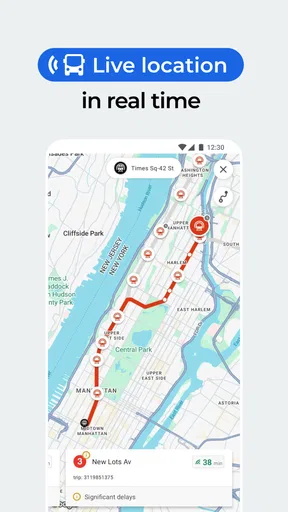
- Real-Time Updates: No more guessing when your bus will arrive. Moovit provides live updates, so you’re always in the loop.
- Trip Planner: Enter your destination, and Moovit will give you the best routes and transit options. It’s like having a personal travel assistant in your pocket.
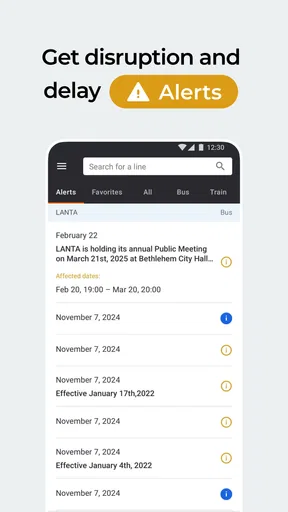
- Service Alerts: Stay informed with notifications about delays, disruptions, or changes in service. A lifesaver during rush hour!
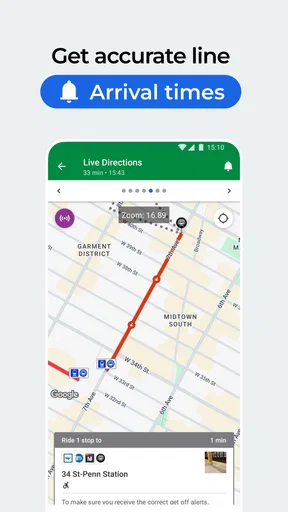
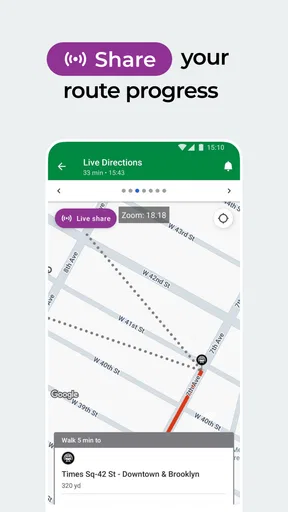
- Step-by-Step Navigation: Moovit guides you through your journey with detailed directions and walking routes. Perfect for those "I’m lost" moments.
One feature I particularly liked was the ability to save favorite locations and routes. You can quickly access frequent trips without having to re-enter your details every time. Super convenient!
My Personal Experience
Now, onto my personal experience with the app. I live in a bustling city with a somewhat complicated transit system, so I’m always on the lookout for tools that make my commute smoother. Moovit did not disappoint.
The first thing I noticed was how intuitive the app is. The layout is clean, and everything is easy to find. I used Moovit to plan my daily commute, and it was incredibly accurate in predicting arrival times. I was able to avoid a few delays thanks to the real-time updates, which saved me a lot of frustration.
Even when I decided to explore a new part of town, Moovit’s step-by-step navigation was spot on. The walking directions were clear, and I never felt lost. It’s like having a local guide with you at all times.
Getting from the first search to a useful route
For a first-time user, the most reassuring way to begin is to try one familiar journey rather than planning an ambitious trip across town. Search for a place you already know, compare the suggested public-transit routes with your usual option, and check the stages before leaving. That gives you a practical sense of how Moovit presents walking, waiting, and riding without making your first attempt depend on unfamiliar streets.
When you are heading somewhere new, use a specific destination rather than only a broad neighborhood name. A station, venue, or recognizable address can make the proposed endpoint easier to judge. Before setting off, look at the entire route: a journey that appears quick may involve a transfer or a walk that matters if you have luggage, limited time, or someone travelling with you.
A realistic use is a weekday trip when a bus is running late. Instead of waiting at the stop and guessing, check the arrival information, then review whether another route is available. I would treat that as help with a decision, not a promise that every vehicle will arrive exactly as shown. Traffic, service changes, and the local transit system can affect what happens after you start walking.
Small habits that make route planning clearer
Saved places and routes are most useful when you give them a little thought. I would save the journeys I genuinely repeat, such as home to work or a regular station connection, rather than filling favorites with one-off trips. On a day when plans change, that keeps the shortcuts useful instead of turning them into another list to search through.
For a trip with a transfer, check the next leg before boarding the first vehicle. This simple habit helps you notice whether the connection is tight and whether you should be ready to leave promptly. It is especially helpful in an unfamiliar area, where the walking segment between stops may take more attention than the ride itself.
Service alerts are worth checking again close to departure, not just while planning at home. A route that looked normal earlier can be affected by a disruption later. I would also keep a second route in mind for an important appointment. Moovit can help you compare options, but having a fallback avoids relying on a single itinerary when arriving on time matters.
Where Moovit fits among transit alternatives
Compared with opening a map app and asking for directions, Moovit puts public transport at the center of the task. That focus can make it more convenient when you need to understand a bus or train journey, its stops, and a transfer. A general map is often the better choice when you are mainly walking, driving, or looking for nearby places rather than trying to follow a transit itinerary.
It is also different from relying only on a transport operator’s app. An operator’s own information can be useful when you already know which network you need, while Moovit is handy for planning a trip that may require comparing public-transit choices. I would still check an operator’s own service channel when a disruption is important or when you need the most direct information about a particular line.
The right choice depends on the journey. For regular city travel across services, keeping a transit-focused planner close at hand makes sense. For a rural trip with limited public transport, a route that depends on walking between distant stops, or a journey where exact local arrangements are crucial, I would confirm the details with the relevant operator and not assume the app can remove every uncertainty.
Who is likely to benefit, and who may prefer another tool
I can see Moovit working particularly well for people who use buses and trains often but do not have every route memorized, as well as visitors trying to make sense of an unfamiliar city. It is also useful for someone who wants to compare possible transit routes before leaving, rather than discovering the transfer pattern one stop at a time.
It may be less appealing if you already know your commute by heart and rarely need live guidance, or if your local services are sparse and there are few practical route choices to compare. Drivers should use a navigation tool designed around driving, while people planning a mostly walking outing may find a general map more direct. I would not make Moovit the only source for a critical trip without checking that the route suits the day’s needs.
As a first step, download it free and try a routine journey. The app is made by Moovit, is rated for Everyone, and its long history in transit navigation is reflected in its release on March 28, 2012. It has an average rating of 3.9 from around 1.5 million ratings, with about 39,000 written reviews and over 100 million installs. Those figures suggest many people have tried it, though they do not guarantee that every local route will be equally dependable.
Costs, expectations, and a sensible first test
The core app is free, with in-app purchases listed from $0.99 to $19.99 per item. I would begin with the free experience and decide whether it fits your routine before considering any purchase. The important question is not how many features an app appears to offer, but whether its route suggestions and live information are useful for the places you actually travel.
On your first outing, allow a little extra time to read the directions and identify the stop where you need to board. If you are travelling with a child, carrying bags, or meeting someone at a fixed time, check the route in advance and keep the destination visible in your plan. That small bit of preparation can make the app feel like a helpful guide rather than something you are trying to interpret while rushing down the street.
It is also reasonable to ask whether you need an account or whether every detail will be available in every city. I would start by searching your own regular destinations and checking whether the options make sense locally. Coverage and the usefulness of arrival information can vary by place, so a quick test near home is more informative than assuming that an experience in one city will transfer perfectly to another.
Why You Should Give Moovit a Try
If you’re still on the fence about downloading Moovit, here’s a little nudge. The app is free, easy to use, and it can potentially save you a lot of time and hassle. Whether you’re a daily commuter or a traveler exploring new places, Moovit is a reliable tool that can enhance your transit experience.
Plus, the fact that it’s available in so many cities worldwide means it’s perfect for international adventurers. No need to download multiple apps for different locations – Moovit has you covered wherever you are.
In conclusion, if you’re looking for a dependable transit tracker, give Moovit a shot. It’s a game-changer for anyone navigating public transportation. You can grab it off the App Store or Google Play, and start exploring with confidence. Happy travels!
Privacy and Permissions
See what permissions an app requests and how it handles your data.
- Identity
- find accounts on the device
- Contacts
- find accounts on the device
- Location
- approximate location (network-based), precise location (GPS and network-based)
- Photos/Media/Files
- read the contents of your USB storage, modify or delete the contents of your USB storage
- Storage
- read the contents of your USB storage, modify or delete the contents of your USB storage
- Camera
- take pictures and videos
- Wi-Fi connection information
- view Wi-Fi connections
- Other
- view network connections, pair with Bluetooth devices, access Bluetooth settings, full network access, control Near Field Communication, run at startup, draw over other apps, use accounts on the device, control vibration, prevent device from sleeping, read Google service configuration
Verdict
Strengths of Moovit: Your Transit Tracker
- Comprehensive transit coverage worldwide.
- Real-time updates on delays and changes.
- User-friendly interface with clear maps.
- Offline route planning available.
- Accessible for visually impaired users.
Limitations of Moovit: Your Transit Tracker
- Occasional inaccuracies in real-time data.
- Battery drain with continuous use.
- Ad-supported free version can be intrusive.
- Limited support in less populated areas.
- Requires internet for most functionalities.
Similar Picks in This Category
View All
Uber - Request a ride
Uber Technologies, Inc.4.7


inDrive. Rides with fair fares
® SUOL INNOVATIONS LTD4.8

Yandex Go: Taxi Food Delivery
Mikromobilnost LLC Belgrade4.8

Bolt: Request a Ride
Bolt Technology4.8

Rapido: Bike-Taxi, Auto & Cabs
Rapido Bike Taxi4.8
You May Also Like
View All


Frequently Asked Questions
What features does Moovit offer for public transit users?
Moovit provides real-time arrival information for buses, trains, and subways, helping you plan your journey efficiently. It includes step-by-step navigation, service alerts, and updates about delays or changes. Additionally, Moovit supports multiple cities worldwide, making it a versatile tool for both daily commutes and travel.
Is Moovit available offline?
Yes, Moovit allows users to download specific transit maps and schedules for offline use. This feature is particularly useful when traveling in areas with limited internet connectivity or when trying to save on data usage. However, real-time updates and alerts require an internet connection.
How accurate is Moovit's real-time transit information?
Moovit uses data from transit agencies and user reports to provide real-time updates. While it strives for accuracy, occasional discrepancies may occur due to unforeseen delays or changes in service. Users are encouraged to report inaccuracies to help improve the app's overall reliability.
Can Moovit be used for ride-sharing or bike rentals?
Yes, Moovit has integrated options for ride-sharing services and bike rentals in certain cities. This feature allows users to seamlessly combine different modes of transportation for a more efficient journey. Availability depends on the partnerships and services in your specific location.
Is Moovit free to use?
Moovit is free to download and use for its basic features, including route planning and real-time updates. However, some advanced features or ad-free experiences may require in-app purchases or subscriptions. Users can choose to upgrade based on their specific needs and preferences.
